
Understanding payment authorization vs settlement is important for any business that accepts card payments, online payments, mobile payments, invoices, or POS transactions.
A customer may see a transaction approved in seconds, but that does not always mean the merchant has already received the money. Authorization and settlement are connected steps, but they do different jobs inside the payment processing cycle.
For small business owners, retailers, restaurants, service providers, eCommerce sellers, payment teams, and accounting teams, this difference affects cash flow, reporting, refunds, payment reconciliation, and customer communication.
It also explains why a sale may show as an approved transaction, a pending transaction, a captured transaction, or a settled transaction before it finally becomes a merchant deposit.
When businesses understand the payment processing workflow, they can review records more accurately, identify payment delays faster, and avoid confusing an approval message with actual settlement funding.
What Payment Authorization Means
Payment authorization is the approval step in a card transaction. It happens when a business asks whether the customer’s card can be used for a specific payment amount. This request may come from a POS terminal, payment gateway, virtual terminal, mobile reader, or eCommerce checkout page.
During payment authorization, several checks may happen quickly. The issuing bank may review available credit or account balance, card status, cardholder verification details, fraud screening results, AVS data, CVV data, transaction amount, merchant category, and risk signals.
If the transaction passes the required checks, the issuer sends back a transaction approval, often with an authorization code.
A credit card authorization or debit card authorization does not complete the full movement of funds. It confirms that the payment may move forward. The transaction still needs to be captured, batched, cleared, settled, and funded.
A declined transaction means the authorization request was not approved. The decline may happen because of insufficient funds, incorrect card details, an expired card, suspected fraud, issuer restrictions, cardholder verification failure, or a temporary issuer issue.
What Happens During Authorization
When a customer presents a card or enters payment details online, the merchant’s system creates an authorization request. That request contains transaction data such as the amount, card details, merchant information, security information, and sometimes additional verification data.
The request typically moves from the POS system or payment gateway to the payment processor. From there, it is routed through the card network to the issuing bank. The issuing bank is the financial institution connected to the customer’s card.
The issuing bank evaluates the request. It may check whether the card is active, whether the customer has enough available credit or balance, whether the CVV matches, whether the billing address matches AVS data, and whether the transaction appears suspicious.
The response then travels back through the same general path. The merchant receives an approved, declined, referral, or error response. If approved, the system may display an authorization code and allow the sale to continue.
This entire payment processing authorization step often happens in seconds, but it involves multiple parties and risk checks. That is why reliable payment gateway settings, accurate card entry, and secure checkout processes matter.
Authorization Does Not Mean the Merchant Has Been Paid
An approved authorization is permission to proceed with the transaction. It is not the same as payment settlement, merchant settlement, or a merchant deposit. The merchant has not necessarily received funds simply because the customer’s card was approved.
Think of authorization as a reservation of payment ability. The issuer confirms that the card can cover the amount at that moment. In many cases, the amount may appear as a pending transaction on the customer’s account. However, the actual funding process comes later.
This difference matters for accounting records. If a business treats every approved authorization as deposited cash, daily reconciliation can become inaccurate. A transaction may be authorized but not captured, captured but not settled, settled but not yet funded, or funded in a deposit that includes adjustments and fees.
This is also why customer questions can be confusing. A customer may say, “The payment came out of my account,” while the business has not received the funds yet. In many cases, the customer is seeing an authorization hold or pending transaction, not the final settled transaction.
What Payment Settlement Means
Payment settlement is the process that finalizes approved transactions and moves them toward merchant funding. While authorization checks whether the transaction can proceed, settlement completes the financial side of the payment processing workflow.
Payment settlement usually involves captured transactions being grouped into a batch. That batch is submitted for clearing and settlement. During clearing, transaction data is exchanged between the acquiring bank, card network, and issuing bank. During settlement funding, funds are prepared for deposit to the merchant account or business bank account.
Credit card settlement and debit card settlement may appear simple on the merchant side, but several steps occur behind the scenes. The payment processor, acquiring bank, issuing bank, and card network all play roles in moving transaction data, calculating fees, and supporting final settlement.
Settlement reports are especially important. They show which transactions were included in a batch, what amounts were processed, which fees or adjustments may apply, and what deposit amount the business should expect.
What Happens During Settlement
Settlement begins after an authorized transaction is captured. Payment capture tells the processor that the business wants to finalize the approved transaction and include it in settlement. In many retail and restaurant POS systems, capture happens automatically. In some eCommerce or service workflows, capture may happen later.
Captured transactions are then included in a batch. A batch is a group of transactions submitted together, often at the end of the business day. The batch close may be automatic or manual depending on the payment setup.
Once the batch is closed, the payment processor sends transaction data for clearing. Clearing helps confirm transaction details between the acquiring side and issuing side. The card network helps route data and apply network rules. The issuing bank prepares to transfer funds, and the acquiring bank prepares to credit the merchant side.
After clearing, settlement funding occurs. The merchant may see a deposit in the merchant account or business bank account, sometimes net of fees, refunds, chargebacks, reserves, or other adjustments.
Why Settlement Can Take Time
Settlement can take time because approval and funding are not the same step. Even after an approved transaction is captured, timing may depend on batch close time, settlement cutoff, processor rules, transaction type, bank processing time, weekends, holidays, risk review, and account setup.
For example, a transaction approved after the batch cutoff may not be included until the next batch. A business that forgets to close a manual batch may delay settlement. A higher-risk transaction may be held for review. A bank may post deposits according to its own processing schedule.
Different payment methods may also behave differently. Card-present payments, card-not-present payments, debit card processing, credit card processing, keyed transactions, and eCommerce transactions may have different risk levels and review patterns.
The merchant’s funding arrangement also matters. Some accounts offer faster deposits when batches close by a certain time. Others follow standard funding schedules. Businesses should review their own settlement settings and reports instead of assuming all approved payments will deposit at the same speed.
Payment Authorization vs Settlement: Key Differences
The simplest way to understand authorization vs settlement is this: authorization approves the payment, while settlement finalizes and funds the payment. Both are essential, but each has a different purpose.
Payment authorization happens near the start of the transaction. It answers the question: “Can this card be used for this payment amount?” Payment settlement happens later. It answers the question: “Which approved and captured transactions are now finalized for funding?”
Authorization affects the customer’s available credit or balance because a hold may appear. Settlement affects the merchant’s cash flow because it moves the transaction toward deposit. Authorization is about approval and risk checks. Settlement is about clearing, funding, reporting, and reconciliation.
For the merchant, this distinction helps prevent reporting mistakes. A business may have many approved transactions at the end of the day, but only the captured and batched transactions will move toward settlement. If a transaction is authorized but never captured, the merchant may not get paid for it.
For customers, this distinction explains pending transactions. A payment may appear pending before the final amount posts. This is common with restaurants, tips, gas stations, hotels, rentals, online orders, and service deposits.
Authorization vs Settlement Comparison Table
| Factor | Payment Authorization | Payment Settlement |
| Main meaning | Approval request for a card payment | Finalization and funding process |
| Main purpose | Confirms the card can be used | Moves captured funds toward deposit |
| Timing | Happens during checkout or payment entry | Happens after capture and batching |
| Key status | Authorized, declined, pending | Captured, settled, funded |
| Funds movement | Usually creates a hold, not a merchant deposit | Moves funds through clearing and funding |
| Customer impact | May reduce available credit or balance temporarily | Final charge posts to the account |
| Merchant impact | Confirms the sale may proceed | Determines deposit timing and reconciliation |
| Main parties involved | Merchant system, gateway, processor, card network, issuing bank | Processor, acquiring bank, card network, issuing bank |
| Common issues | Declines, duplicate authorizations, expired holds, verification failures | Delayed deposits, unsettled batches, mismatched reports |
| Records to review | Authorization code, transaction approval, gateway log | Batch report, settlement report, deposit report |
How the Payment Processing Cycle Works From Start to Finish
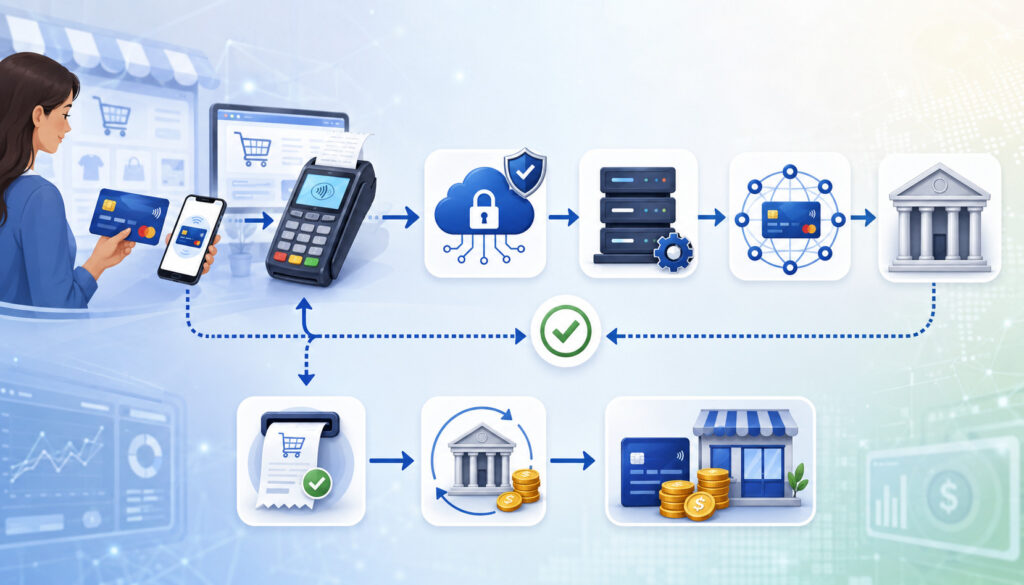
The payment processing cycle is a sequence of steps that turns a customer’s payment attempt into a completed merchant deposit. Although modern systems make this feel instant, the full payment processing workflow includes authorization, capture, batch settlement, clearing, funding, reporting, and reconciliation.
A typical POS transaction or eCommerce checkout begins when the customer provides payment details. The merchant’s system sends a transaction authorization request. The issuing bank approves or declines it. If approved, the transaction may be captured immediately or later.
Captured transactions are grouped into a batch. The batch is submitted for settlement. The transaction data is cleared between the acquiring bank and issuing bank through the card network. Funds are then prepared for merchant settlement and eventual deposit.
After funding, the accounting team still has work to do. Deposits must be matched to sales records, fees, refunds, chargebacks, tips, adjustments, and batch reports.
Step One: Customer Starts the Payment
The payment cycle begins when a customer chooses to pay. In a store, the customer may tap a contactless card, insert a chip card, swipe a magnetic stripe card, use a mobile wallet, or provide card details to staff. Online, the customer may enter card details at eCommerce checkout or use a saved payment method.
At this stage, the merchant’s system collects payment data and transaction details. The transaction amount, merchant information, card data, and security information are prepared for routing.
Card-present payments often include data from the chip or contactless interaction. Card-not-present payments may rely more heavily on billing address, CVV, device signals, fraud screening, and gateway rules.
This first step must be accurate. Incorrect amounts, duplicate entries, wrong invoice numbers, or poor checkout settings can create problems later during capture, settlement, refunds, or reconciliation.
Step Two: The Authorization Request Is Sent
Once the payment data is entered, the merchant’s system sends an authorization request. In a physical location, the request may start at the POS terminal. Online, it usually starts through the payment gateway.
The payment processor helps route the request. The card network identifies the appropriate issuing bank. The issuing bank reviews the transaction and decides whether to approve or decline it.
The request may include cardholder verification data, amount, merchant category, transaction type, AVS response, CVV response, and fraud-screening indicators. Strong data quality helps reduce errors and may support better risk decisions.
For card-not-present payments, this step is especially important because the card is not physically read by a terminal. Businesses should use appropriate verification tools without creating unnecessary friction for legitimate customers.
Step Three: The Transaction Is Approved or Declined
After the issuing bank reviews the transaction authorization request, it sends a response. The most common responses are approval or decline. An approval allows the merchant to continue. A decline means the transaction should not be completed with that card.
A referral response may mean additional verification is needed. An error response may mean the request could not be completed because of a technical or communication issue.
A declined transaction does not always mean the customer did something wrong. Declines can happen because of insufficient funds, issuer fraud controls, expired cards, incorrect data, card restrictions, travel patterns, or temporary issuer problems.
Staff should avoid guessing the reason for a decline. The safest approach is to ask the customer for another payment method or advise them to contact their card issuer.
Step Four: The Transaction Is Captured
Payment capture is the step that connects an approved authorization to settlement. Capture tells the payment processor that the merchant wants to finalize the approved amount.
In many retail environments, authorization and capture happen close together. The customer pays at checkout, the sale is approved, and the transaction is captured automatically. This is common for standard card-present sales.
In other workflows, capture may be delayed. An eCommerce seller may authorize the payment when an order is placed and capture it when the order ships. A service business may authorize a deposit and capture the final amount later. A restaurant may authorize the meal amount and capture the final amount after a tip is added.
If a transaction is authorized but not captured before the authorization expires, the merchant may need to request a new authorization.
Step Five: Transactions Are Batched for Settlement
After capture, transactions are typically grouped into a batch. Batch settlement allows a business to submit multiple captured transactions together, often at the end of the business day.
Some systems close the batch automatically at a scheduled time. Others require manual batch close. In restaurants and retail environments, batch timing can affect tip reporting, daily sales totals, and deposit timing.
End-of-day settlement is important because it helps move approved sales into the funding process. If a batch remains open, captured transactions may not be submitted for settlement on time.
Businesses should confirm whether their POS system, gateway, or processor uses automatic batch close or manual batch close. They should also know the settlement cutoff time that affects deposit timing.
Step Six: Funds Are Cleared and Deposited
Once a batch is submitted, the transactions move through clearing and settlement. Clearing confirms transaction details and helps calculate the amounts owed between the issuing and acquiring sides. Settlement prepares the movement of funds.
The merchant eventually receives a deposit. The deposit may not equal gross daily sales because fees, refunds, chargebacks, reserves, tips, adjustments, or batch timing may affect the final amount.
This is why payment reconciliation is essential. The accounting team should compare POS sales, gateway reports, batch settlement records, processor reports, and bank deposits.
A clean reconciliation process helps businesses catch missing transactions, duplicate payments, incorrect capture amounts, delayed funding, and unexpected fees.
What Is an Authorization Hold?

An authorization hold is a temporary hold placed on a customer’s available credit or account balance after a card authorization is approved. It helps confirm that funds or credit are available before the final transaction amount is settled.
Authorization holds are common in industries where the final amount may not be known at the exact moment the card is first used. Hotels, restaurants, gas stations, delivery services, rental businesses, online sellers, and service businesses may use preauthorization or holds in certain situations.
A hold does not always equal the final charge. The final settled amount may be the same, lower, or higher depending on the business type and applicable rules. For example, a restaurant may authorize the bill before the final tip is added. A hotel may authorize room charges plus an incidental amount.
Customers may see these holds as pending transactions. The hold may reduce available credit or available balance until it is captured, reversed, adjusted, or allowed to expire.
Why Authorization Holds Happen
Authorization holds happen because the business needs confirmation that payment is available before providing goods or services. This protects the merchant from accepting a card that cannot cover the expected charge.
In some cases, the final amount is uncertain. A gas station may not know the final fuel amount when the card is first authorized. A hotel may not know whether incidental charges will apply. A service business may need to reserve payment ability before completing work.
Holds also help reduce risk. If the card is lost, closed, restricted, or over limit, the authorization process can detect the problem before the merchant completes the transaction.
However, holds must be managed carefully. Excessive or unclear holds can frustrate customers and create support issues.
How Holds Affect Customers
From the customer’s perspective, an authorization hold may look like a charge even before the payment is settled. It may appear as pending in online banking or card account activity.
The customer’s available credit or balance may be temporarily reduced. If the final transaction settles for a different amount, the original pending amount may change, disappear, or be replaced by the settled amount.
This can create confusion. A customer may think they were charged twice if they see both a pending hold and a final posted transaction. Usually, the pending hold is released after the final settlement posts or after the issuer removes the hold.
Businesses should explain that pending transactions are controlled largely through issuer and network processes. The merchant can often void, reverse, or adjust certain transactions, but the customer’s bank controls how quickly pending activity disappears from the customer’s view.
What Is Payment Capture?

Payment capture is the step that turns an approved authorization into a transaction ready for settlement. Without capture, an authorization may remain only a temporary approval.
Capture can happen automatically or manually depending on the payment system and business model. Many POS transactions use automatic capture. Some eCommerce, service, reservation, and shipping-based workflows use delayed capture.
Payment capture matters because it affects whether the merchant can be funded. An approved authorization that is never captured may not move into batch settlement. This can create missing revenue if staff assume approval alone is enough.
Capture also affects customer experience. Capturing too early may create issues if an order cannot be fulfilled. Capturing too late may allow the authorization to expire. Capturing the wrong amount may create refund, dispute, or accounting problems.
Automatic Capture
Automatic capture means the transaction is captured shortly after authorization without requiring a separate manual step. This is common for standard retail, restaurant, and many eCommerce transactions where the customer receives the product or service right away.
Automatic capture simplifies operations. Staff do not need to remember to capture each transaction. The system prepares approved sales for batch settlement according to the configured workflow.
This setup works well when the final sale amount is known at checkout. A customer buys a product, pays the final amount, and leaves with the item. The authorization and capture can happen as part of the same checkout flow.
Even with automatic capture, businesses should still review reports. A transaction may fail to capture because of a technical issue, configuration problem, batch issue, or transaction error.
Manual or Delayed Capture
Manual or delayed capture means the business authorizes the card first and captures the payment later. This approach is useful when the final amount or fulfillment status is not confirmed immediately.
An online seller may authorize payment when the order is placed, then capture when the item ships. A service business may authorize a deposit before an appointment, then capture the final amount after the work is complete. A rental business may authorize an estimated amount before returning the final charge.
Delayed capture can help prevent charging customers before the business is ready to fulfill the order. It can also help manage backorders, reservations, deposits, and variable final amounts.
However, delayed capture requires discipline. Staff need to monitor uncaptured authorizations, expiration windows, partial captures, and canceled orders. Otherwise, the business may lose the ability to capture the original authorization.
Batch Settlement Explained
Batch settlement is the process of submitting a group of captured transactions for settlement. Instead of settling every transaction individually in real time, many card processing workflows group transactions into batches.
A batch may include a day’s card-present payments, eCommerce payments, tips, adjustments, voids, and other activity depending on the system. When the batch is closed, it is sent for clearing and settlement.
Batch settlement affects deposit timing. If the batch closes before the cutoff, funding may follow the expected schedule. If the batch closes late, deposit timing may shift. If the batch is not closed at all, transactions may remain unsettled.
Batch reports are valuable because they connect front-end sales activity to back-end deposits. They help payment teams and accounting teams confirm what was submitted for settlement.
Automatic Batch Settlement
Automatic batch settlement means the system closes the batch at a scheduled time. This is common in many modern POS systems, gateways, and merchant account setups.
Automatic batch close can reduce human error. Staff do not need to remember to manually close the batch every night. This can be especially helpful for businesses with late hours, multiple locations, or rotating managers.
However, automatic batch settlement still needs monitoring. If the automatic close time is poorly aligned with business hours, transactions may fall into the wrong business day. Restaurants with tips and adjustments should ensure staff complete tip entry before the batch closes.
Businesses should periodically confirm that automatic batch close is working properly. A configuration change, terminal issue, gateway setting, or connectivity problem may affect settlement without obvious front-end warning.
Manual Batch Settlement
Manual batch settlement requires an employee or manager to close the batch. This gives the business more control, but it also creates more responsibility.
Manual batch close may be useful when the business needs to review tips, adjust final amounts, correct errors, or confirm end-of-day totals before settlement. Restaurants, salons, service businesses, and certain specialty retailers may use this workflow.
The risk is that someone may forget to close the batch. If the batch remains open, captured transactions may not be submitted for settlement on time. This can delay deposits and create confusion during reconciliation.
A good manual batch process should include a closing checklist, manager verification, exception review, and daily documentation. Staff should know who is responsible for closing the batch and what to do if the batch does not close correctly.
Common Transaction Statuses and What They Mean
Transaction statuses help merchants understand where a payment stands in the payment processing workflow. Different systems may use slightly different wording, but the core meanings are usually similar.
| Status | What it means | Merchant impact | Customer impact |
| Authorized | The issuer approved the payment request | Transaction may proceed, but funds are not deposited yet | May see a pending transaction |
| Captured | The approved transaction was marked for settlement | Transaction can be included in a batch | Pending amount may remain until posting |
| Pending | The transaction is not fully finalized | Needs monitoring or may await settlement | May reduce available balance or credit |
| Settled | The transaction completed settlement processing | Expected to appear in funding reports | Final charge may post |
| Funded | Funds were deposited to the merchant side | Deposit can be reconciled | Customer usually sees posted charge |
| Declined | The issuer did not approve the request | Sale should not be completed with that card | Customer may need another payment method |
| Voided | Transaction canceled before settlement | Prevents the transaction from settling | Pending hold may later release |
| Refunded | Money returned after settlement | Reduces net sales or deposit activity | Customer receives credit after processing |
| Reversed | Authorization hold corrected or released | Helps fix or release pending authorization | Pending amount may be removed |
| Charged back | Customer dispute reversed funds through issuer process | Funds and fees may be withdrawn | Customer may receive dispute credit |
| Expired | Authorization was not captured in time | Merchant may need a new authorization | Pending hold may disappear |
Status tracking helps prevent mistakes. For example, a business should not issue a refund for a transaction that was only authorized and not settled. A void or reversal may be more appropriate depending on timing and system rules.
Why Approved Payments May Not Settle Immediately
An approved payment may not settle immediately because settlement depends on more than authorization. A transaction can be approved but still waiting for capture, batching, clearing, risk review, or bank processing.
Batch timing is one of the most common reasons. If a transaction is approved after the settlement cutoff, it may not be included until the next batch. If the batch is not closed, settlement may be delayed.
Delayed capture can also explain the gap. Some businesses intentionally authorize first and capture later. If capture does not happen, the transaction may remain pending or eventually expire.
Processor review may delay certain transactions. Unusual amounts, high-risk patterns, card-not-present orders, suspicious activity, duplicate transactions, or new merchant account activity may trigger additional review.
Bank processing schedules also matter. Deposits may not post instantly even after settlement occurs. Weekends, holidays, account settings, funding arrangements, and bank processing time can affect when money appears.
Configuration problems can also cause delays. Incorrect gateway settings, terminal communication issues, closed merchant accounts, batch errors, or mismatched settlement settings may prevent transactions from moving normally.
Voids, Refunds, and Reversals: How They Relate to Authorization and Settlement
Customers sometimes confuse a pending authorization with a final charge, so businesses should also understand general consumer dispute rights related to using credit cards and disputing charges, especially when handling refunds, chargebacks, and customer questions.
Voids, refunds, and reversals are often confused because all three can correct or undo payment activity. The key difference is timing.
A void usually cancels a transaction before settlement. A refund usually returns funds after settlement. A reversal may release or correct an authorization hold before the transaction becomes a final posted charge.
Using the wrong action can create accounting problems. For example, refunding a transaction that has not settled may fail or create confusion. Voiding a transaction after settlement may not be possible. Reversing a hold may not equal refunding a completed sale.
Businesses should train staff on the difference. This is especially important for restaurants, retail stores, eCommerce sellers, and service businesses that handle cancellations, duplicate payments, order changes, and customer disputes.
When a Void May Be Used
A void may be used when the business needs to cancel a transaction before it settles. Common examples include duplicate payments, wrong amounts, customer cancellations, cashier errors, or accidental card entries.
Voids are useful because they can stop the transaction from moving into settlement. If successful, the merchant avoids processing a completed sale that later needs to be refunded.
However, the customer may still see a pending transaction for a short time. That pending hold may remain until the issuer updates the account activity. The merchant can usually confirm the void, but the customer’s bank controls how pending items display.
Staff should save void receipts or records. This helps answer customer questions and supports internal reconciliation.
When a Refund May Be Used
A refund is usually used after a transaction has settled. Once the merchant has been funded or the transaction has posted, a refund returns money to the customer through the payment system.
Refunds are common for returns, canceled services after payment, product issues, pricing corrections, partial credits, or customer satisfaction situations. A refund may be full or partial depending on the business policy and system capability.
Refunds affect accounting records. They reduce net sales and may appear separately from the original transaction. They may also settle in a different batch than the original sale.
Businesses should document refund reasons, approval authority, customer communication, and receipt details. This reduces confusion and helps with payment reconciliation.
When a Reversal May Be Used
A reversal may be used to correct or release an authorization hold. It can help when an authorization was created but should not remain pending.
For example, a business may reverse a duplicate authorization, adjust a preauthorization, or release a hold after a customer cancels before capture. Reversals can reduce customer frustration when a pending transaction is no longer needed.
However, reversals are not always instant from the customer’s perspective. The issuer controls when pending activity disappears from the cardholder’s account view.
Businesses should avoid promising an exact release time unless their processor and issuer rules support that statement. A better approach is to provide a receipt or confirmation and explain that the card issuer controls final display timing.
Card-Present vs Card-Not-Present Authorization and Settlement
Card-present and card-not-present transactions follow similar overall steps, but the risk profile and verification process may differ. Card-present payments happen when the card or mobile wallet is physically used at a terminal. Card-not-present payments happen when card details are entered online, over the phone, through an invoice, or through a stored credential.
Card-present payments often use chip, contactless, or swipe data. These methods provide stronger evidence that the card or wallet was present at checkout. Card-not-present payments rely more on digital verification, fraud screening, AVS, CVV, device data, customer history, and risk rules.
Settlement timing may also differ depending on the payment setup. A POS transaction may capture immediately and settle with the daily batch. An online order may authorize at checkout and captured later when shipped.
Both transaction types require accurate reporting. Businesses should separate card-present and card-not-present activity when reviewing fees, declines, chargebacks, fraud patterns, and settlement reports.
POS and In-Person Transactions
In-person POS transactions usually follow a fast authorization process. The customer taps, inserts, swipes, or uses a mobile wallet. The terminal sends the payment processing authorization request through the processor and network to the issuer.
If approved, the POS records the sale. Many systems capture the transaction automatically, then include it in the day’s batch settlement.
Restaurants and tip-based businesses may have an extra step. The initial authorization may be based on the pre-tip amount. Staff may add tips before batch close, and the final captured amount may differ from the original authorization.
In-person merchants should monitor terminal connectivity, tip adjustment procedures, batch close timing, and end-of-day reports. These details help ensure that approved transactions become settled transactions.
Online and eCommerce Transactions
Online and eCommerce transactions are card-not-present payments. Because the physical card is not read by a terminal, the payment gateway and fraud tools play a larger role.
The gateway may collect CVV, billing address, shipping address, device information, customer account history, order details, and fraud screening signals. AVS and CVV results may help identify mismatches, but they do not guarantee that a transaction is safe.
Some online businesses capture immediately. Others authorize first and capture when the order ships. Delayed capture can be useful for inventory control, backorders, subscriptions, custom orders, or fraud review.
Online sellers should monitor pending authorizations, failed captures, high-risk orders, settlement batches, refunds, and chargebacks. A strong reporting routine helps prevent revenue leakage and customer confusion.
How Tips, Adjustments, and Final Amounts Affect Settlement
Some businesses authorize one amount and settle another. This often happens in restaurants, salons, delivery businesses, hospitality businesses, and service environments where tips, adjustments, or final totals are added after the initial authorization.
For example, a restaurant may authorize the customer’s card for the meal amount. After the customer adds a tip, the staff enters the final amount. The captured amount then includes the tip and is submitted for settlement.
This process must be handled carefully. If staff enter the tip incorrectly, forget to adjust the transaction, or close the batch too early, the final settlement amount may be wrong. That can affect employee tips, customer trust, and accounting records.
Adjustments may also apply in service situations. A deposit may be authorized first, then the final amount may be captured after the service is completed. If the final amount differs significantly, the business may need a new authorization or customer confirmation depending on its payment rules and risk controls.
Businesses should document adjustment procedures clearly. Staff should know when adjustments are allowed, who can approve them, how to correct errors, and when to void or refund instead.
How Authorization and Settlement Affect Cash Flow
Authorization and settlement directly affect cash flow management because they control the difference between approved sales and deposited funds. A business may have strong sales activity but still experience cash flow pressure if settlement funding is delayed or reconciliation is unclear.
Approved transactions are not the same as available operating cash. Funds may still be pending, waiting for batch settlement, under review, or in transit through bank processing.
This matters for payroll, inventory purchases, supplier payments, rent, loan payments, and daily operating expenses. Businesses should plan based on actual deposit timing, not only gross sales.
Settlement reports, batch reports, and bank deposits help create a more accurate cash flow picture. They show what was captured, settled, adjusted, refunded, disputed, or funded.
Reviewing Settlement Reports
Settlement reports show which transactions were included in a batch and what amount should move toward funding. They may include transaction totals, batch totals, refund activity, fee details, chargeback adjustments, and deposit references.
Reviewing these reports helps businesses confirm that captured transactions were actually submitted for settlement. It also helps identify missing transactions, duplicate entries, incorrect amounts, and delayed batches.
A daily settlement review is especially useful for businesses with multiple registers, multiple locations, tips, online orders, or high transaction volume. It creates a clear bridge between front-end sales and back-end deposits.
The review should be assigned to a specific role. When everyone assumes someone else checked settlement, errors can go unnoticed.
Matching Deposits to Sales
Bank deposits may not match daily gross sales exactly. This does not always mean something is wrong. Deposits may be reduced by processing fees, refunds, chargebacks, reserves, adjustments, or prior-period corrections.
Batch timing can also create differences. A late-night transaction may be included in a different settlement batch than the sales report date. Online transactions may settle separately from in-store transactions. Tip adjustments may change final totals after initial authorization.
Accounting teams should match deposits to settlement reports, not only to POS gross sales. The settlement report explains what the processor submitted and funded.
A good reconciliation process separates gross sales, net sales, fees, refunds, disputes, and deposits. This makes financial statements more accurate and reduces month-end cleanup.
Payment Reconciliation After Settlement
When disputes occur after settlement, understanding chargebacks and how they affect businesses can help teams connect payment disputes, withdrawn funds, and reconciliation records more accurately.
Payment reconciliation is the process of matching payment records across systems. It helps confirm that the business received the correct funds for the transactions it accepted.
A practical reconciliation workflow may include:
- Compare POS sales reports with gateway transaction reports.
- Confirm which transactions were authorized, captured, voided, refunded, or declined.
- Review batch settlement reports for each business day.
- Match settlement totals to processor deposit reports.
- Compare deposit reports with bank statement deposits.
- Identify processing fees, chargebacks, reserves, and adjustments.
- Investigate missing, duplicate, or mismatched transactions.
- Document corrections and assign follow-up responsibility.
Payment reconciliation should happen regularly. Daily review works well for many restaurants, retailers, and high-volume businesses. Weekly review may work for lower-volume businesses, but waiting too long can make errors harder to trace.
Businesses should also keep organized records. Receipts, invoices, order IDs, authorization codes, settlement reports, refund records, and dispute documents may all be needed later.
Strong reconciliation supports cleaner accounting records, faster issue resolution, better cash flow management, and more reliable financial reporting.
Common Payment Authorization and Settlement Problems
Payment problems often happen because authorization, capture, settlement, and funding are misunderstood or not monitored closely. Many issues are fixable when businesses know where to look.
Common authorization issues include declined authorizations, duplicate authorizations, expired authorizations, incorrect card details, AVS mismatches, CVV failures, issuer blocks, and suspected fraud responses.
Common settlement issues include unsettled batches, delayed deposits, missing captures, incorrect capture amounts, batch close failures, mismatched settlement reports, and transactions that appear in one system but not another.
Pending holds are another frequent source of confusion. Customers may believe they were charged when the merchant sees only an authorization. Staff should know how to check transaction status before issuing a refund or making promises.
Refund confusion can also create problems. A customer may expect an immediate refund, but refunds must process through payment systems and card issuers. The refund may not appear instantly on the customer’s account.
The best defense is a consistent review process. Businesses should check transaction statuses, close batches properly, review exception reports, and document unusual activity.
Best Practices for Managing Authorization and Settlement
Good payment management is not only about accepting cards. It is about managing the entire payment processing cycle from checkout to reconciliation.
Helpful best practices include:
- Close batches on time.
- Confirm whether batch settlement is automatic or manual.
- Review authorization, capture, and settlement reports daily.
- Train staff on voids versus refunds.
- Monitor pending transactions and uncaptured authorizations.
- Document tips, adjustments, deposits, and service changes.
- Review payment gateway settings regularly.
- Separate card-present and card-not-present reporting.
- Investigate delayed deposits quickly.
- Reconcile bank deposits to settlement reports.
- Maintain clear refund and cancellation policies.
- Keep receipts, authorization codes, and transaction records organized.
- Monitor chargebacks and respond with complete documentation.
- Review processor statements for fees, batch charges, and settlement adjustments.
Businesses should also avoid unsupported assumptions. If a transaction is missing from a deposit, check its status before deciding what happened. If a customer sees a pending transaction, confirm whether it was authorized, captured, voided, reversed, or settled.
Pro Tip: Create a simple payment issue checklist for staff. Include steps for checking status, identifying batch activity, escalating processor issues, and documenting customer communication.
FAQs
What is the difference between payment authorization and settlement?
Payment authorization is the approval step. It confirms whether the customer’s card can be used for the transaction amount. The issuing bank may check available credit, account status, cardholder verification data, fraud risk, AVS, CVV, and other information before approving or declining the request.
Payment settlement is the finalization and funding process. It happens after the transaction is captured and submitted in a batch. Settlement moves the transaction through clearing and prepares funds for deposit to the merchant side.
The easiest way to remember the difference is this: authorization approves the payment, while settlement finalizes and funds it.
Does authorization mean the merchant has been paid?
No. Authorization does not mean the merchant has already been paid. It means the issuer approved the transaction request and the payment may move forward.
The merchant generally receives funds after capture, batch settlement, clearing, and funding. Until those steps happen, the transaction may be approved but not deposited.
This is why businesses should avoid treating approved authorizations as cash in the bank. Settlement reports and deposit reports provide a more accurate view of actual funding.
What does payment settlement mean?
Payment settlement means approved and captured transactions are finalized through the payment system and moved toward merchant funding. Settlement usually includes batching, clearing, and deposit preparation.
A settled transaction has moved beyond the approval stage. It has been submitted for final processing and is expected to appear in merchant funding records.
Settlement is important because it connects sales activity to actual deposits. Without settlement, an approved transaction may not become usable business cash.
Why is my transaction approved but still pending?
A transaction can be approved but still pending because authorization happens before final settlement. The issuing bank may place a temporary hold while the transaction waits for capture, batch settlement, clearing, and posting.
Pending status may also happen when the final amount is not yet known. Restaurants, hotels, gas stations, rentals, and some service businesses may authorize first and settle later.
If the transaction is voided or reversed, the pending item may still appear until the card issuer updates the customer’s account display.
What is an authorization hold?
An authorization hold is a temporary hold on available credit or account balance after a transaction authorization is approved. It helps confirm that the customer can cover the expected payment amount.
The hold may later become a settled transaction, be adjusted to a final amount, be reversed, or expire. Customers often see holds as pending transactions.
Authorization holds are common when the final amount may change, such as tips, deposits, fuel purchases, reservations, and service adjustments.
What is payment capture?
Payment capture is the step that tells the processor to finalize an approved authorization for settlement. It turns an authorization into a transaction ready to be included in a settlement batch.
Capture may be automatic or manual. Many POS sales capture automatically, while some online orders, reservations, and service transactions use delayed capture.
If a transaction is authorized but not captured, the merchant may not be funded. That is why uncaptured authorizations should be reviewed regularly.
How long does settlement take?
Settlement timing depends on batch close time, processor rules, merchant account setup, transaction type, bank processing, weekends, holidays, and possible risk review. Some deposits may arrive quickly, while others may take longer.
A business should review its own processor reports and funding schedule to understand normal timing. The most reliable answer is usually found in the merchant account settings, settlement reports, and deposit history.
If deposits are delayed beyond the normal pattern, the business should check batch status, capture status, risk review notices, bank activity, and processor alerts.
What happens if a batch is not settled?
If a batch is not settled, captured transactions may not move forward for clearing and funding on time. This can delay merchant deposits and create reconciliation problems.
In a manual batch environment, someone may need to close the batch before settlement can proceed. In an automatic batch environment, a technical issue or setting problem may prevent batch close.
Businesses should monitor open batches daily. A missed batch can affect cash flow and make deposits appear lower than expected.
What is the difference between a void and a refund?
A void usually cancels a transaction before it settles. It is often used for duplicate charges, incorrect amounts, or customer cancellations before the batch closes.
A refund usually happens after settlement. It returns money to the customer after the transaction has already been finalized.
The timing matters. If a transaction has not settled, a void may be the correct action. If it has settled, a refund may be required.
Why does the settled amount differ from the authorized amount?
The settled amount may differ from the authorized amount because of tips, adjustments, partial captures, shipping changes, deposits, taxes, service changes, or corrected final totals.
Restaurants are a common example. The initial authorization may cover the bill, while the final settlement includes the tip.
Businesses should review final captured amounts before batch settlement. Incorrect adjustments can lead to customer complaints, refunds, disputes, and accounting errors.
How do businesses reconcile settlement deposits?
Businesses reconcile settlement deposits by comparing POS sales, gateway reports, batch reports, settlement reports, deposit reports, and bank statements.
The goal is to confirm which transactions were authorized, captured, settled, funded, refunded, voided, reversed, or charged back. Fees and adjustments should also be recorded.
A strong reconciliation process helps businesses find missing transactions, delayed deposits, duplicate charges, and mismatched totals before they become larger accounting problems.
Conclusion
Payment authorization and payment settlement are separate but connected steps in the payment processing cycle. Authorization confirms that a card payment can proceed. Settlement finalizes captured transactions and moves them toward funding. Funding is when the merchant receives the deposit.
This distinction matters because an approved transaction is not always the same as money in the bank. A payment may be pending, authorized, captured, batched, settled, funded, voided, refunded, reversed, or disputed depending on where it stands in the payment processing workflow.
Businesses that understand payment authorization vs settlement can manage cash flow more accurately, answer customer questions with more confidence, reduce reporting confusion, and improve payment reconciliation.
The best approach is to close batches properly, review settlement reports, monitor pending transactions, document adjustments, train staff on voids and refunds, and match deposits to actual settlement records.
When authorization and settlement are managed carefully, payment records become clearer, deposits become easier to track, and the business gains better control over its day-to-day financial operations.
Leave a Reply